Instructions & sharing
Turn a solved job into deliverables: step-by-step loading-instruction PDFs, and a read-only 3D viewer link to share with someone who has no API key.
When to use this
- Your warehouse/driver needs printable, per-carrier loading instructions.
- You want to share a read-only view of the packed load with someone who has no API key.
Walkthrough
Loading-instruction PDFs (a derived job)
Instructions render one PDF per carrier in the packed result; there is no single archive for the whole job. Because rendering takes work, requesting instructions is a derived job: it creates a new, separate job that you poll on its own, then you download PDFs from it one carrier at a time.
1. Start it. POST /v2/jobs/{id}/instructions (where {id} is your succeeded source job) creates the derived job and returns 202 with a Location header pointing at it:
curl -X POST https://api.loadoptimizer.ai/v2/jobs/01975cba-67b9-7b7c-a2f1-3d29e4a01c44/instructions \
  -H "X-Api-Key: ck_live_..."
{ "jobId": "01975e02-7c7c-7000-8000-00000000abcd", "status": "queued" }
That jobId is the instructions job, not the source job: the Location header already points at /v2/jobs/{newId}, so you never have to leave the /v2 surface to find it. If the source job hasn't succeeded, there's nothing to render: 409 (code job_not_succeeded).
2. Poll the new job, not the source. GET /v2/jobs/{newId}, exactly like any other job, until succeeded. See Async & validate.
3. Download a PDF, one carrier at a time. GET /v2/jobs/{newId}/instructions?carrier={n} (using the instructions job id) returns one application/pdf document. carrier is the 1-based position of the carrier in the carriers[] array of the source job's result: carrier=1 is carriers[0], carrier=2 is carriers[1], and so on. Omit it and you get the first one.
That array position is how you label a downloaded PDF: read the same position out of GET /v2/jobs/{id}/result and take that carrier's externalId and instance from it. Don't try to derive n from instance: instance restarts at 1 for each carrier type, so as soon as a job uses more than one type the two numberings diverge. A result holding one of each of two types has two carriers whose instance is 1, and they are carrier=1 and carrier=2. Count positions in carriers[]; don't reason about types.
curl "https://api.loadoptimizer.ai/v2/jobs/01975e02-7c7c-7000-8000-00000000abcd/instructions?carrier=1" \
  -H "X-Api-Key: ck_live_..." \
  -o carrier-1.pdf
While the render is still in progress this is 404 (code artifact_not_ready); keep polling. An unknown or foreign instructions job id is also a 404, but with code job_not_found instead; give up on that one. There's no separate status for an artifact retention has since cleaned up: it reads exactly like artifact_not_ready, so an instructions job you never downloaded from in time looks, on the wire, exactly like one that's still rendering.
A single PDF can mix page orientations: step pages render A4 landscape when that carrier's step illustration is wider than roughly 2.4:1, and A4 portrait otherwise; the summary page at the front is always portrait regardless of the carrier's shape. A long, narrow carrier's document is therefore landscape steps behind a portrait cover. If you embed these PDFs in a viewer, paginate them, or generate thumbnails, read each page's own size rather than assuming one shape for the whole document.
Shareable 3D viewer link
POST /v2/jobs/{id}/share, called on a succeeded job, mints a read-only link to a hosted, human-facing 3D viewer page, a URL you hand to people (warehouse, customer, planner) who have no API key. They open it in a browser and explore the packed load.
Minting a link is a paid feature, checked before anything else on this call, even the job lookup: an account whose plan does not include link sharing gets 403 (code: "link_sharing_not_entitled") instead of a link. Revoking is never gated this way: an account that loses the feature can still take down a link it already minted.
This is a page for people, not a component for your app. There is no embeddable widget and no programmable viewer SDK: the share link is not meant to be iframed into your product or driven by code. If you're building your own visualization, render it yourself from the result: read the
placementsgeometry (positions, sizes, orientations, and originalgeometry) out ofGET /v2/jobs/{id}/result. The share link and the viewer are strictly a no-code, human-facing convenience.
curl -X POST https://api.loadoptimizer.ai/v2/jobs/01975cba-67b9-7b7c-a2f1-3d29e4a01c44/share \
  -H "X-Api-Key: ck_live_..."
The response is 201 Created:
{
  "shareId": "St9F2vQ7mK4pXb2N",
  "url": "https://viewer.loadoptimizer.ai/St9F2vQ7mK4pXb2N",
  "expiresAt": "2027-03-01T12:00:00+00:00"
}
url is null when no viewer address is configured for your deployment; shareId is the token that matters regardless. The link you hand out is url: it opens the read-only viewer in a browser and needs no API key, so you can send it to anyone. The 201 also carries a Location header pointing at /shares/{shareId}/result. That is not a second copy of the link and not something to send on: it is where the viewer resolves the share internally, it is not part of this API, and opening it directly answers 401. Ignore it and use url.
How the link stays safe. The link carries an opaque, unguessable shareId, not your job id. Possessing the link is the only credential needed to open the viewer (so you can send it to anyone, no account required), and that's all it grants: a read-only view of this one job's result. It can't be used to call the API, poll job status, or reach any other job or account data. Your job id is never exposed by the link, and the authenticated API still requires your own API key (another account's job id just returns 404). Stop a link working at any time by revoking it, or let it lapse at expiresAt.
Revoke it with DELETE /v2/jobs/{id}/share, which answers 204 and is idempotent: a job with no active link still returns 204. Re-sharing a job rotates the token, and there is only ever one active link per job: minting a new one retires whichever link existed before, revoke or not.
curl -X DELETE https://api.loadoptimizer.ai/v2/jobs/01975cba-67b9-7b7c-a2f1-3d29e4a01c44/share \
  -H "X-Api-Key: ck_live_..."
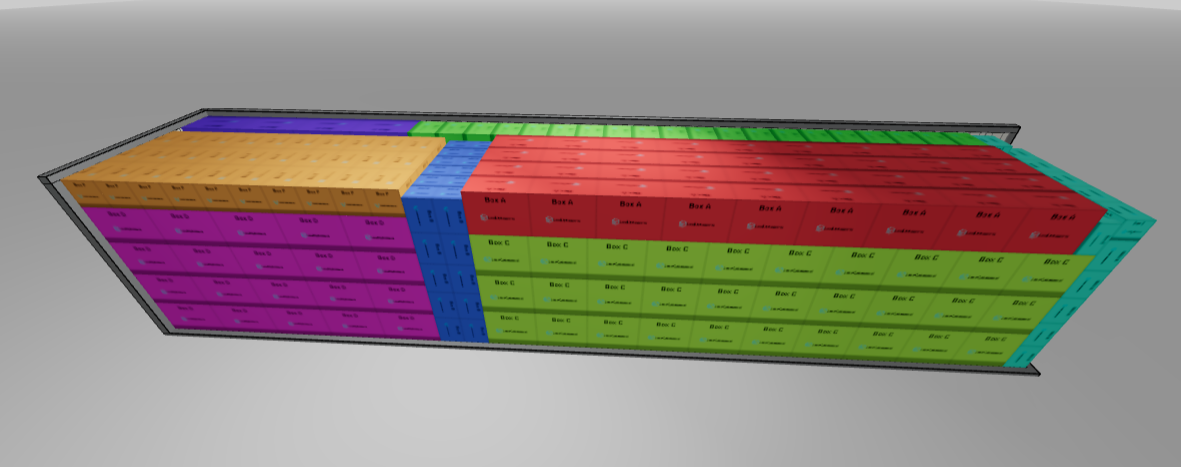
The read-only 3D viewer opened from a share link: colour-coded items in the loaded carrier.
What the recipient sees. The viewer shows the same plan GET /v2/jobs/{id}/result returns you: the same axis frame, the same min-corner positions and rotated sizes, the same colours and labels. Which shape it renders is fixed when the link is minted, so a link minted through this /v2 endpoint keeps showing the /v2 plan even if you later work against another surface. What it never shows is the job id, the request you submitted, any other job, or anything about your account.
Retention & expiry
A share link carries its own expiresAt: check it before you assume a link you minted is still live, and re-share if you need it to keep working past that window.
Three things can stop a link working, and they are worth telling apart when someone reports that it does not open:
| Situation | What the recipient gets |
|---|---|
You revoked it with DELETE .../share, or re-shared the job (which rotates the token) |
The viewer does not open: the link no longer exists. Indistinguishable from a made-up token, on purpose |
The link is past its expiresAt |
The viewer does not open. Mint a fresh link with another POST .../share |
| The job behind it has been purged by retention | The viewer does not open, even though the link itself had not expired |
Revoking is immediate and total: DELETE .../share always answers 204 to the account that called it, and anyone still holding the old URL afterwards is in exactly the same position as someone who invented a token. There is deliberately no signal that the link ever existed. Re-sharing has the same effect on the old link, or because the result it points at has since been purged. Build a viewer that handles both statuses; one that only expects 404 will be surprised the first time a link simply ages out.
A rendered instructions PDF has no expiry field of its own: once retention has cleaned an artifact up, fetching it just reads as artifact_not_ready, the same answer you'd get from a render that's still in progress, not a distinct "gone" status. Re-request instructions from the source job if you need the PDF again.
Key fields
| Field | Where | Notes |
|---|---|---|
jobId |
instructions 202 body |
The derived instructions job: poll and download from this id, not the source. |
carrier |
query, instructions download | 1-based position of the carrier in the source job result's carriers[] array, not its instance number. Omitted → the first carrier. |
shareId |
share 201 body |
Opaque token in the link: distinct from the job id; the only credential the link carries. |
url |
share 201 body |
Public read-only 3D viewer link. null if no viewer address is configured. |
expiresAt |
share 201 body |
When the share link stops resolving. |
Notes & caveats
- Two different job ids.
POST …/instructionscreates a new job; poll and download using that job's id, not the source job's. - Source must have succeeded before you request instructions or a share, or you'll get
409(codejob_not_succeeded). - One PDF per carrier, not one archive per job. Fetch each carrier's PDF separately with
?carrier={n}. artifact_not_readyvsjob_not_found. Both are404s on the instructions download, but only the first means "keep polling"; the second means the job id is wrong or isn't yours.- The share link is a hosted viewer for people. It opens a read-only 3D page meant for humans to look at; there's no embeddable widget or SDK. Integrators who want their own visualization render it themselves from the
placementsgeometry in the result.
Related
- Async & validate: polling the derived instructions job; the closed
error.codeset for arender_error. - Errors & troubleshooting:
artifact_not_ready,job_not_succeeded, and the other problem+json codes.