Core concepts
This page covers the core model the rest of the documentation assumes. For the request shape itself (every top-level key in one place), see Anatomy of a job.
Load units & roles
A job is built from two flat lists: carriers[] and cargo[]. Every entry in either list (box geometry only) has a geometry of type "box" (dimensionX/dimensionY/dimensionZ). What differs between the two lists is the fields around that geometry, matching each list's role in the shipment.
Supply vs. demand: carriers[] and cargo[]
carriers[]= supply: what you load into. Each carrier has anexternalIdecho label and aquantity: how many instances are available. Omitquantityand the solver decides how many instances to use; when you supply it, it must be greater than zero.cargo[]= demand: what you ship. Each line has anamount(how many identical units to place) and aweight. Whatever the solver can't place comes back inunplacedItems(see Results below).
Both lists are flat: a carrier cannot go inside another carrier, and a cargo entry cannot itself hold other cargo. So a loaded pallet is not something you can place inside a truck in one job. Nesting carriers that way is planned for a future release.
Coordinate frame
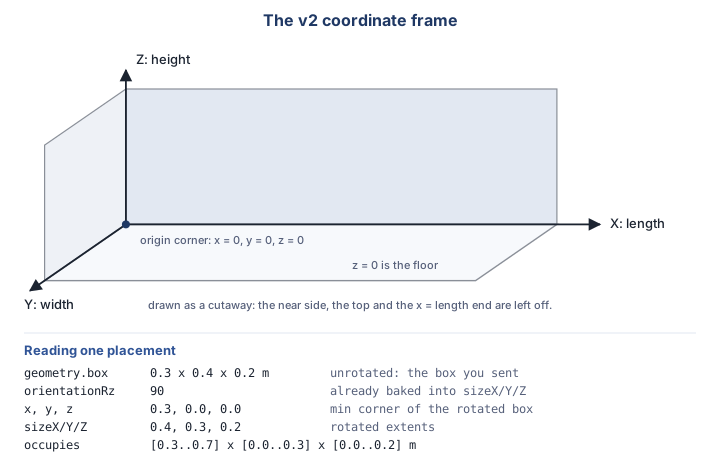
The axes are fixed for every carrier:
| Axis | Meaning |
|---|---|
X: dimensionX, sizeX, x | Longitudinal: the length. x = 0 is the origin corner of the carrier's own coordinate system, and the default -X consolidation packs cargo toward it. |
Y: dimensionY, sizeY, y | Lateral: the width. |
Z: dimensionZ, sizeZ, z | Vertical: the height. z = 0 is the floor. |
All positions and sizes are in the job's units.length; rotations (orientationRx/Ry/Rz) are always in degrees. The frame is right-handed, and positive angles follow the right-hand rule: orientationRz = 90 takes +X toward +Y: counter-clockwise seen from above, looking down at the floor.
Reading a placement: orientation and size values
Every placed box in the result is described by four groups of fields. Knowing which group to trust, and which one not to act on, is the whole difference between a renderer that is correct and one that only looks correct.
| Fields | What they carry |
|---|---|
x, y, z | The box's minimum corner: the lowest X, Y and Z point of its axis-aligned bounding box within the carrier. |
sizeX, sizeY, sizeZ | The placed box's extents along each axis, with any rotation already applied, not its original pre-rotation dimensions. |
orientationRx, orientationRy, orientationRz | The box's orientation about each axis, in degrees. sizeX/Y/Z and x/y/z already reflect this rotation, so do not apply it again when plotting the box. |
geometry.box.dimensionX/Y/Z | The original, unrotated dimensions you submitted for that cargo line. |
A placement also echoes group (singular), the source cargo line's groups array. On its own that is a display label with no effect on where the box sits. It becomes structural for the labels the job declares: a job that lists a name under the top-level groups block and sets configuration.groupSeparation packs that group's cargo into its own contiguous run along the packing axis, in the packingOrder the declaration gives it. To find which section a placement belongs to, intersect its group array with the names the job declared: at most one can match, because a cargo line that names two declared groups is rejected. See Separating groups along the carrier in Anatomy of a job for the full rules.
Drawing the box
Draw an axis-aligned box from (x, y, z) extending +sizeX, +sizeY, +sizeZ. That is the entire renderer. Because every angle is a multiple of 90°, a placed box is always axis-aligned, so this path needs no rotation maths, and no handedness, at all.
The trap: applying
orientationR*on top of the minimum corner rotates the box a second time, and it will no longer sit where the solver put it. Both this mistake and its opposite (treatingx/y/zas a corner measured before rotation) look perfectly correct for a box that isn't rotated. Always test a renderer against a rotated one.
Worked example
One box submitted with a geometry.box of 0.3 × 0.4 × 0.2 m, placed with a 90° turn about Z:
| Field | Value |
|---|---|
x, y, z | 0.3, 0.0, 0.0 |
sizeX, sizeY, sizeZ | 0.4, 0.3, 0.2 |
orientationRz | 90 |
The box occupies [0.3..0.7] × [0.0..0.3] × [0.0..0.2] m, exactly the minimum corner plus the rotated extents above, with no further rotation applied. Note what the rotation did and did not do: sizeX and sizeY are the submitted 0.3 and 0.4 swapped, while geometry.box still reports the box you sent. Plot the box from 0.3, 0.0, 0.0 and it lands where the solver put it.
Units
A job-level units block sets the unit per kind, one per kind for the whole job: length, weight, volume, area and ldm. Omit any kind and it falls back to its default: m / kg / m3 / m2 / m. The result echoes the units it used, so nothing is ambiguous. area and ldm are accepted and echoed but express nothing in the result today. See Units.
Jobs & lifecycle
Solving is asynchronous. You submit a job and poll it:
queued → running → succeeded | failed | cancelled
The last three are terminal. The flow:
POST /v2/jobs→202 Acceptedwith ajobId.GET /v2/jobs/{id}→status+percentage.GET /v2/jobs/{id}/result→ the packing result oncesucceeded.
Use POST /v2/jobs/validate for a dry-run that checks a request without creating a job. See Async & validate for polling, cancellation and idempotent retries.
Results
The result carries a summary (totals), carriers[] (each with its own placements[]), unplacedItems[] for whatever didn't fit, and the units block the job used.
Each placement carries an itemId, a GUID assigned by the API, one per cargo line (array element), not per unit: a line with amount: 5 yields five placements that all share the same itemId. Two otherwise-identical cargo lines still get distinct itemIds. This is the reliable way to join a placement, or an unplaced entry, back to the cargo line that produced it.
On a cargo line, externalId is whatever label you sent: optional, may be empty, may repeat across lines. Display it. Don't join on it; join on itemId.
One consequence of itemId being assigned by the API is worth planning for: you cannot send one, and you first see it in the result. So if your cargo[] holds several lines that are indistinguishable by their contents (same dimensions, same weight, same free-form labels), the itemIds that come back are distinct but anonymous, and only the order of the request array tells you which line each one stands for. externalId is not unique unless you make it so, and that is the way out: give each of those lines a distinct externalId. It comes back on every placement and every unplaced entry, so you can attribute results without relying on array order.
A carrier works the other way round. There is no carrier-side itemId, so externalId together with instance is the only identifying information a packed carrier carries about the carrier entry you offered. The result does echo more than that pair (a packed carrier also comes back with its name, its category and its geometry), but none of those has to be unique either, so they help you only as far as your entries genuinely differ in them. And the pair itself is not a guaranteed key: duplicate carrier externalIds are allowed, and instance counts from 1 again for every carrier entry. So offer two entries that are otherwise indistinguishable (both labelled EUR-PALLET, same name, same dimensions), and the result can hold two carriers that are both ("EUR-PALLET", 1), with nothing left to say which entry each one came from.
So the same practice covers both lists: if you need to join results back to your request, make your externalIds distinct: one per carrier entry, and one per cargo line you could not otherwise tell apart. It costs nothing at submit time and it removes the ambiguity entirely.