Constraints
Two per-item controls tell the solver what it may do with a cargo line once it is placed: whether other cargo may rest on top of it, and which way it may be turned.
When to use this
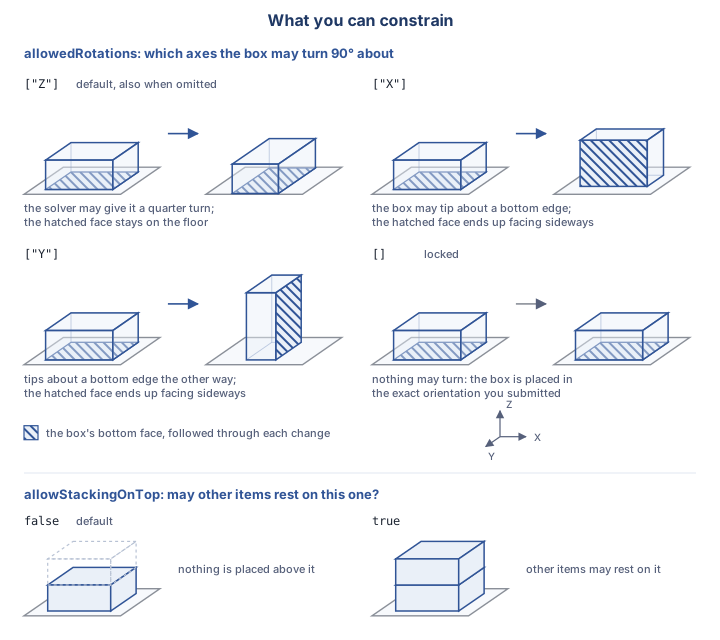
allowedRotations(top): four before-and-after pairs. The box stands on a floor and its bottom face is hatched, so you can follow that one face through the change. Under["Z"]the box makes a quarter turn and the hatched face stays on the floor; under["X"]or["Y"]the box tips about a bottom edge and the hatched face ends up facing sideways; under[]the two poses are identical, because nothing may turn.allowStackingOnTop(bottom): whether other items may rest above this one.
- You need to stop other cargo from being stacked on a fragile or top-heavy line.
- You need to keep a cargo line upright, restrict it to specific faces, or forbid any rotation at all.
Walkthrough
Stacking & support
allowStackingOnTop is a boolean under constraints on a cargo entry. It controls whether other cargo may be placed directly on top of this one:
{
  "externalId": "TV-55",
  "category": "box",
  "amount": 40,
  "geometry": { "type": "box", "dimensionX": 1300, "dimensionY": 200, "dimensionZ": 800 },
  "weight": 22,
  "constraints": {
    "allowStackingOnTop": false
  }
}
allowStackingOnTop:false(the default) means nothing may be placed on top of this cargo line;trueallows other items to be stacked on it.
Orientation
allowedRotations is the only rotation control on a cargo entry: this API has no separate boolean toggle for permitting an item to tilt onto its side. It names which axes ("X", "Y", "Z", case-insensitive) the box may be turned 90° about, relative to the orientation you submitted it in:
{
  "externalId": "GLASS-PANEL",
  "category": "box",
  "amount": 60,
  "geometry": { "type": "box", "dimensionX": 1600, "dimensionY": 50, "dimensionZ": 1100 },
  "weight": 35,
  "constraints": {
    "allowedRotations": []
  }
}
| Value | Meaning |
|---|---|
| omitted | ["Z"]: upright, may spin about the vertical axis |
["Z"] |
the footprint turns; the box stays upright |
["X"] or ["Y"] |
the box tips onto another face |
[] |
no rotation at all, placed exactly as submitted |
| an unknown token | 400 |
Tokens are case-insensitive ("z" and "Z" are the same). Omitted is not the same as empty. Leaving out allowedRotations falls back to the default: upright, free to spin about Z; sending [] explicitly locks the box in the exact orientation you submitted, with no rotation permitted at all.
Packing the load toward one end or side (consolidation) is a secondary objective, not a per-item constraint. See Optimization objectives.
Key fields
| Field | Where | Type | Meaning |
|---|---|---|---|
constraints.allowStackingOnTop |
cargo entry | boolean | Whether other items may rest on top of this one. Default false. |
constraints.allowedRotations |
cargo entry | string[] |
Axes (X/Y/Z) the box may be turned 90° about. Omitted → ["Z"]; [] → locked in the submitted orientation. |
Notes & caveats
- Constraints are per cargo line only. Carriers in this API have no
constraintsfield; only a cargo entry carries one. - These two fields are the whole model. There is no priority field on a cargo line, no class tags, and no relational rules between load-units in this API today.
- Omitted vs. empty is not the same for
allowedRotations. Omitting it defaults to["Z"](upright, may spin); sending[]explicitly forbids any rotation.
Related
- Building load units: how a cargo line's geometry and weight are described.
- Optimization objectives: consolidation and CenterLoadMass, the secondary objectives that shape the plan.
- Errors & troubleshooting: the two 400 shapes a validation failure can come back as.